Google Ads Makes It Easier to Add Location Assets Using Google Maps
Google has quietly rolled out a new feature in Google Ads that makes managing location assets (formerly known as location extensions) quicker and more intuitive. Advertisers can now select their business locations directly by searching in Google Maps—a big shift that should save time and reduce the hassle for campaign managers.
What’s New
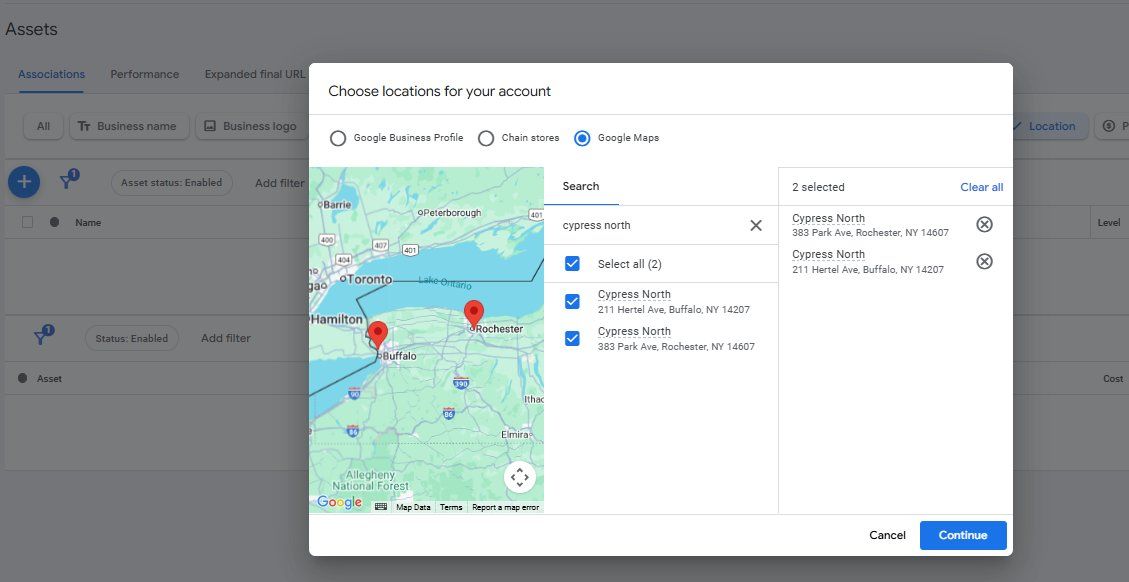
Traditionally, advertisers linked their location assets in Google Ads by syncing them with a Google Business Profile or using chain store options. But now, Google has added the ability to search and select business locations directly via Google Maps.
This update was first spotted by Greg Kohler, who shared a screenshot of the change on X, noting:
“New (easier) way to add location assets (extensions) to your Google Ads campaigns – now you can search and select your business using Google Map.”
Marketer Joe Youngblood also praised the change, calling it:
“One of the single most agonizing parts of building out a new campaign or taking over an old account. This looks like it will fix it!”
And for many advertisers, this might indeed be the fix they’ve been waiting for.
How It Works
According to Google Ads’ updated help documentation, here’s a quick breakdown of the process:
- Go to Location manager within the Tools menu under the Shared library.
- Click the “+” button and choose “Our locations.”
- Enter a physical address or key phrase to search your business on Google Maps.
- Select the locations to link with your Ads account (up to 10 at a time).
- Save and continue.
Google notes that these locations must belong to your business, or they risk being disapproved.
Once selected, advertisers can still customize how these location assets are applied:
- Use them across the account,
- Create Location groups to target subsets for campaigns, or
- Opt for “No location asset” if they should not apply for certain campaigns or ad groups.
Why This Matters
For advertisers who manage multiple storefronts or inherit existing accounts, setting up location assets has often been a tedious process. By tapping into Google Maps search, this update removes unnecessary friction and makes it easier to sync accurate, real-world business locations with ad campaigns.
This functionality is expected to save time, reduce setup headaches, and potentially improve local ad targeting performance.
Final Take
While the change might seem minor, for agencies and businesses running campaigns at scale, this is a major usability upgrade. Easier location management means faster campaign launches and fewer errors in setup.
Credit: Search Engine Land for spotting and reporting this feature update.